5 Powerful Ways to Use NotebookLM Beyond Studying

santosh rouniyar
Tue Jul 21 2026
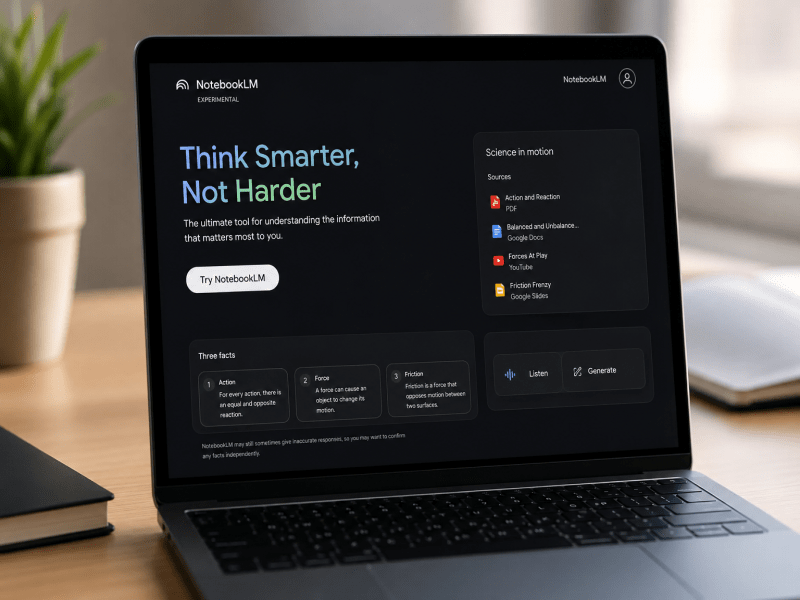
When Google launched NotebookLM in 2023, it was positioned as a personalized AI research assistant for students. And honestly? I made the same assumption. I figured it was another study tool, great for cramming for exams or organizing lecture notes, but not much else.
I couldn't have been more wrong.
Over the past two years, NotebookLM has quietly evolved into one of Google's most useful AI productivity tools. It no longer helps you only study, it can organize research, summarize complex documents, brainstorm ideas, and even create podcast-style audio and video presentations from your own content.
Here are five powerful ways I've used NotebookLM that have nothing to do with studying.
Quick Summary
| Use Case | Best For |
| Turn Research Into Instant Answers | Professionals, analysts, consultants |
| Create Podcasts and Videos From Documents | Bloggers, content creators, marketers |
| Replace Scattered Notes With a Second Brain | Knowledge workers, writers, researchers |
| Prepare for Meetings and Interviews Faster | Managers, team leads, sales professionals |
| Brainstorm Better Ideas With Your Own Knowledge | Writers, authors, creative professionals |
1. Turn Research Into Instant Answers
If you've ever spent hours digging through folders, email threads, and old presentations just to find one piece of information, you know the pain I'm talking about.
NotebookLM solves this by letting me upload everything into a single notebook. I've used it for market research, uploading competitor annual reports, industry whitepapers, and news articles, then asking the AI to identify patterns across sources or synthesize key trends. The responses come with citations, so I know exactly where the information came from.
Pro Tip: Keep each notebook focused on a single project for more accurate responses. NotebookLM can't access information across multiple notebooks, so a dedicated notebook for each project is essential.
Who benefits: Consultants, analysts, managers, and anyone who deals with large volumes of documents.
2. Create Podcasts and Videos From Documents
This one genuinely blew my mind. NotebookLM's Studio panel can now turn any collection of documents into podcasts, videos, mind maps, and reports.
The Audio Overview feature creates podcast-style conversations between two AI hosts discussing your material. Google recently added new formats including Brief (a single host summary), Critique (two hosts offering feedback), and Debate (two hosts discussing different perspectives). I've used it to turn dense research papers into something I can listen to during my commute.
The Video Overview feature takes it further, generating narrated slide presentations with images, diagrams, quotes, and numbers pulled directly from my documents. As Google describes it, this makes it "uniquely effective for explaining data, demonstrating processes and making abstract concepts more tangible". Video Overviews are now available in 80+ languages globally.
Pro Tip: You can now create multiple outputs of the same type in a single notebook, like Audio Overviews in different languages or Video Overviews tailored to different audiences.
Who benefits: Bloggers, content creators, marketers, educators, and anyone who needs to repurpose research into multiple formats.
3. Replace Scattered Notes With a Second Brain
This is where NotebookLM became indispensable for me personally. I had notes scattered across Google Docs, random folders, and browser tabs. I wanted a single, dynamic space that would adapt as my projects evolved.
NotebookLM became that space. Unlike traditional note-taking apps that rely on tagging or manual linking, NotebookLM reads across everything simultaneously, treating my entire knowledge base as one interconnected document. I don't spend time organizing, I just upload and let the AI make the connections.
With the recent Deep Research feature, NotebookLM can now act like a dedicated researcher, automatically browsing hundreds of websites on your behalf and generating organized, source-grounded reports. You can even add the report and its sources directly into your notebook. And with support for new file types, including Google Sheets, images, .docx files, and PDFs from Drive, it's easier than ever to build a comprehensive knowledge base.
Pro Tip: NotebookLM and NotebookLM Plus are now included as core services for Google Workspace Business and Enterprise customers, offering enterprise-grade data protections. Your uploads, queries, and responses stay within your organization.
Who benefits: Knowledge workers, writers, researchers, and anyone drowning in digital clutter.
4. Prepare for Meetings and Interviews Faster
This one saves me hours every week. For meeting prep, I drop in agendas, pre-read materials, and transcripts. NotebookLM summarizes key points, highlights decisions, and outlines next steps in minutes.
Pro Tip: You can now customize chat to adopt a specific goal, voice, or role. For example, you can tell NotebookLM to "Act as a lead marketing strategist" or "Treat me like a PhD candidate". This makes responses far more relevant to your specific context.
With public notebook sharing, I can create a collaborative research space and share it with my team via a simple link. Team members can ask follow-up questions, read AI-generated FAQs, or listen to podcast-style overviews without touching the original files.
Who benefits: Managers, team leads, sales professionals, and anyone who regularly prepares for meetings or interviews.
5. Brainstorm Better Ideas With Your Own Knowledge
This is the most surprising use case I've discovered. Writer's block isn't about having nothing to say, it's about being buried under everything you've already said, unable to see the connections.
I loaded a year's worth of scattered thoughts, half-finished drafts, and random observations into NotebookLM. What came back wasn't just summarization, it was pattern recognition. The AI surfaced themes I'd been circling for months without realizing it.
I asked NotebookLM to brainstorm article angles based on my notes. It suggested: "What if you wrote about how productivity tools create the anxiety they claim to solve?" I'd never articulated it that way, but it was pulling from notes where I'd complained about the very tools I was using.
Pro Tip: Use NotebookLM's Learning Guide feature, which encourages participation with probing, open-ended questions instead of just giving answers. It helps you break down problems step-by-step and adapts explanations to your needs.
Who benefits: Writers, authors, bloggers, and anyone who generates ideas for a living.
Tips to Get Better Results
Here's what I've learned from using NotebookLM extensively:
- Keep notebooks focused. Each notebook should have a clear, singular purpose.
- Name your sources clearly. Since NotebookLM cites source names in responses, good titles make your notebook easier to navigate.
- Experiment with chat goals. Tell NotebookLM to act like a PhD advisor, a marketing strategist, or even a Game Master for a text-based simulation.
- Use multiple formats. Don't just stick to chat, generate Audio Overviews, Video Overviews, mind maps, and reports from the same sources.
- Take advantage of saved chat history. Your conversations are now automatically saved, so you can close a session and resume it later.
Limitations
Let's be real, NotebookLM isn't perfect. It can't access information from multiple notebooks at the same time. There's no graph view, bi-directional linking, or tags like you'd find in dedicated PKM tools. And while it's grounded in your sources, it can still miss key points or misquote them. Always verify important information.
Who Should Use It?
- Business professionals for research, meeting prep, and knowledge management
- Content creators for repurposing research into multiple formats
- Team leaders for project coordination and onboarding
- Writers and creatives for brainstorming and continuity editing
- Anyone who wants to build a second brain without the overhead of traditional PKM tools
Final Thoughts
Most people still think NotebookLM is a study tool. In reality, it's evolving into a powerful research and productivity platform. With constant upgrades, from the redesigned Studio panel to custom chat personas to Video Overviews in 80 languages, its applications extend far beyond the classroom.
Whether you're managing projects, creating content, or organizing knowledge, spending a few hours learning NotebookLM can save you many more over time.
The question isn't whether you should use NotebookLM. The question is: which of these five ways will you try first?
Disclaimer: This article is for informational purposes only and is based on the features available at the time of writing. NotebookLM may change as Google releases updates. Always verify important information with official sources before making decisions.

 loading="lazy">
 loading="lazy">
 loading="lazy">
 loading="lazy">
 loading="lazy">
 loading="lazy">
 loading="lazy">
 loading="lazy">
💬 Comments